

Understand how
work time is spent.
No stopwatch timing. No manual data entry.
Trusted in
40+ countries
Used at
10,000+ sites
Trusted by manufacturers
Sumitomo Wiring Systems
Nissan Motor
Suzuki Motor
Fuji Electric
DENSO
AISIN
Kyocera
Marelli
EBARA
PILLAR
Toray
GE HealthCare Japan
Seiko Epson
Analyze activities in three steps
01
Upload a work video

Use a smartphone or an existing fixed camera. With no observer required, you can analyze work routinely rather than only on special occasions.
02
Let AI classify activities

AI detects task boundaries and classifies value-adding, supporting, incidental, and waste work. Automated measurement avoids differences caused by individual observers.
03
See time totals and charts

Color-coded timelines and time distribution charts are generated with the analysis. Export to Excel to incorporate results into your existing process analysis sheets.
Features
Practical tools for everyday work on the shop floor.
Automatic work classification
Upload a video to analyze work
AI classifies tasks directly from video
No stopwatch measurement needed
No manual entry into Excel

Customize your categories
Use classification rules that fit your site
Define categories from scratch
Or let AI classify the work for you
Apply consistent classification rules

Automatic charts
Turn analysis results into charts
Automatically chart classification results
Summarize total time by category
Count how often each activity occurs

Analyze multiple workers
Visualize each person's work separately
Analyze several people working together
Understand each worker's movements
See how each worker spends their time

Man-machine charts
Analyze people and machines together
Analyze machine operation and human movement
Quantify waiting time and occurrences
Use the results to analyze coordinated work
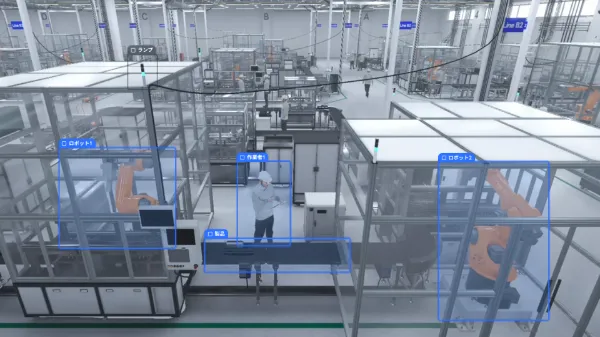
Compare work analysis tools (Japanese)
More features
Translation

Translate the output text to share issues and improvement ideas with factories overseas.
Downloads

Export results as PowerPoint with video or as CSV. Save them locally and share them within your organization.


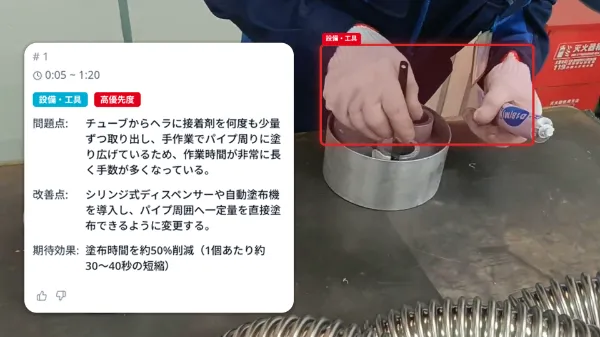

See Ollo Factory in action
Explore the product in a free online demo with our team.
Request a free demo

Customer Stories
Results from our customers
Customer perspectives

Nissan Motor Co., Ltd.
A major step toward solving AI analysis challenges on assembly lines where hands are difficult to capture
Introducing Ollo Factory has been a major step toward solving the challenges of AI analysis on assembly lines where workers' hands are difficult to capture. We look forward to making previously difficult work analysis possible and advancing visibility and improvement at our production sites.
Tetsuya Hayashi, General Manager, Monozukuri Innovation Department, Production Engineering Division
Read story (Japanese)

Suzuki Motor Corporation
High expectations for technology that efficiently transfers expert skills to new workers
Our collaboration with Ollo began about a year ago. From the outset, we had high expectations for technology that uses AI to efficiently pass advanced skills from experienced workers to new employees. We are very encouraged that introducing Ollo Factory has made a solution to this challenge possible.
Kazuo Ichino, Executive Vice President
Read story (Japanese)

GE HealthCare Japan
A major advantage is that people can use it regardless of experience
Introducing Ollo Factory has made work analysis more efficient and kaizen activities smoother. Analysis that previously took a great deal of time can now be completed quickly, helping shop-floor teams identify improvement opportunities and act on them sooner.
Mr. Daiku, Hino Plant Manager
Read story (Japanese)
5 reasons to choose Ollo Factory
01

Easy to use
Just upload a video. A simple interface anyone can use, with no specialist knowledge required.
02

Research-led AI
Built by a team led by CEO Kento Kawai, who studied AI at the University of Tokyo’s Matsuo Lab.
03

Easy setup
Start with your smartphone and PC. No additional equipment is needed.
04

Hands-on support
Get practical help through a dedicated support chat.
05

Built for security
IP access controls, face blurring, and ISMS certification for enterprise security.
