

Published:
Training & Standardization
How to Create Video Work Instructions for Manufacturing

Manufacturing video manual creation: how to create it | The manufacturing video manual is a teaching material that shares the actions and positions to be confirmed with video and explanation. However, simply filming the entire operation does not convey what to observe and judge.
This article explains the six-step process from preparation to editing, content confirmation, and updating for changes using the example of automobile component unit assembly. Aim for a video that allows newcomers to understand the actions and confirmation points.
- Content suitable for the video manual and information to keep separately
- 1. Determine the target audience and the "capable state"
- 2. Organize the shooting procedure and confirmation points in a storyboard
- 3. Shoot confirmation points in a non-hidden position
- Distinguish between overall view and hand view
- Shoot the approved standard operation
- Confirm audio, display, and surrounding information
- 4. Combine one procedure and one judgment into a single unit
- 5. Before starting use, confirm whether the target can reproduce it
- 6. When changing, update the video, standard, and education together
- Frequently asked questions
- Can it be made with a smartphone alone?
- Is new employee education complete if there is a viewing history?
- Summary: Make shooting, editing, confirmation, and update a single operation
- Ollo Factory, a manufacturing-specialized work analysis AI that can automate the draft of video manuals and Excel expansion
- ① Automatically generate the initial draft of the procedure and explanation
- ② Expand to existing Excel formats
- Watch Ollo Factory’s Video Manual AI in Action
Content suitable for the video manual and information to keep separately
Information to convey in the video | Information to manage in documents and standard tables |
|---|---|
Component orientation, insertion movement, and placement on the fixture | Target part number, approved drawings, specifications, and condition tables |
Order of closing, viewing direction display | Approved closing conditions and inspection judgment criteria |
Normal operation and situations where to stop and report | Responsibility of the person in charge during abnormal situations, isolation, and reporting rules |
The video conveys orientation for movements and confirmation positions, while documents manage numerical data and judgment criteria. Combine both, clearly indicating which part number and specification the material corresponds to. When displaying numbers in subtitles, determine the version of the referenced condition table and the person responsible for reviewing the video when conditions change.
1. Determine the target audience and the "capable state"
First, decide who will learn which operation. For a "newcomer-friendly assembly video," the scope is broad, so specify "matching the target part and placing it in the correct orientation on the designated fixture." If there is prior training on equipment operation or required permissions, present them as prerequisites for viewing.
Completing the video and being able to perform the actual operation alone are different. Determine the evaluation method for practical skills, including quality and safety checks, in advance to clearly define what to show in the video.
2. Organize the shooting procedure and confirmation points in a storyboard
The shooting range is used according to the content to be conveyed.
Shooting method | What to include in the screen | Purpose |
|---|---|---|
Overall angle | Component box, fixture, finished product placement, and operator movement path | Conveying where to take and move what |
Close-up angle of the hand | Target part, identification mark, fixture, and hand | Conveying component orientation and the location to view after setting |
Subtitles separate the "setting the part" action from the movement and confirmation. Example: "Place the identification mark in the same orientation as the photo on the fixture." "Confirm that there is no floating at the designated confirmation point." The face does not need to be shown, but the hand and tool should not hide the confirmation position.
The storyboard is a planning table that organizes the shooting scene and the content to be conveyed. The following table is an example of filling out the form for planning shooting based on the approved unit assembly procedure. This is not a record of the video actually shot and verified.
Cut | What to display | What to look at | Description and subtitle content |
|---|---|---|---|
① Part matching | Display of actual product and specified parts | How to distinguish similar parts | Position for matching the target part number |
② Setting on the fixture | Hand, part, fixture | Orientation and seating | Place it at the designated location and check for floating |
③Seal | Tools and sealing points | Designated order and completion indication | Reference to usage conditions, order, and result confirmation |
④Inspection | Target location and inspection indication | Position to determine pass/fail | Refer to the approved condition table for pass/fail criteria |
⑤Abnormal situation | State after stopping operation | Do not return to normal flow | Guide the isolation and reporting procedure |
If showing "correct orientation," a distinguishing feature must also be visible. Avoid a composition where explanation is done only through subtitles, which hides from the camera; instead, change the angle or add a still image.
3. Shoot confirmation points in a non-hidden position
Distinguish between overall view and hand view
Choose the shooting position according to the content to be conveyed
Overall position relationship:Create a viewing angle that shows equipment, parts, and worker movement
Detailed confirmation points:Shoot the hand view so that the orientation of the part and the display of the tool are visible
Confirmation of shooting position:Try shooting a cycle and check with your hands and body whether important points are hidden
Install the camera or tripod in a position that does not obstruct the operation and is outside the range of movement of the equipment
Shoot the approved standard operation
Perform the procedure without skipping steps at the usual speed. Do not use methods such as removing safety devices for shooting, intentionally creating anomalies in the real machine, etc. If an abnormal example is needed, present it using approved safe explanation methods, diagrams, and material showing the stop state.
Confirm audio, display, and surrounding information
If the explanation cannot be heard from machine sound, add narration or subtitles later. Do not shoot if the display of tools cannot be read due to reflection, the video is blurred, the part is dark and cannot be distinguished; these are candidates for reshooting. Follow the rules of shooting and sharing, and do not include unnecessary personal information or confidential disclosures.
4. Combine one procedure and one judgment into a single unit
Divide procedures such as "set" and "seal" and indicate the confirmation in that scene with subtitles or arrows. It is important to make a unit that clearly conveys the necessary actions and judgments, rather than setting a uniform length for the video. Even after fine-division, confirm whether the connection to preceding and following work is clear.
Write subtitles concisely, including actions, confirmation points, and reasons. For example, "place the part" becomes "place the part in the designated orientation and confirm the seat" to make the viewing location clear. Align company-specific part names, abbreviations, and translation terms with expressions used in the field.
Using generative AI to draft composition and subtitles is possible. However, verify whether it is supplementing hidden work or guessing part names and judgment conditions by comparing the video and official documents.
The task of dividing the video by procedure and drafting explanation text can be supported by AI. Ollo Factory's creation and output functions can be confirmed in product documentation.
5. Before starting use, confirm whether the target can reproduce it
Confirmation | Pass indication standard |
|---|---|
Procedure | Approved standard and order/target conditions are consistent |
Visibility | The parts, hand view, and display required for judgment are visible |
Subtitles | The actual operation matches, and the reference sources for terms and numbers are correct |
Abnormal situation | Confirm the actions of stopping, separating, and reporting |
Practical demonstration | Confirm reproduction in accordance with the rules of guidance and evaluation |
Copyright management | Understand the process, version, approvers, and revision date |
Use the stopped sections during viewing or the questions asked by the operator as improvement materials. Do not assume "you should be able to see it," but confirm which information was insufficient.
6. When changing, update the video, standard, and education together
When the part number, fixture, placement, and judgment criteria change, decide who will check the video. Not only the changed parts, but also the impact on preceding and following procedures and check points, should be considered. Record the new version approval, the withdrawal of the old version, the notification to the target audience, and the necessary retraining.
To grasp the update count, measure not only the shooting time but also the editing, subtitle correction, confirmation, and replacement. It is more important to maintain the correct usable state even after changing the number of videos than to increase the number of videos.
Frequently asked questions
Can it be made with a smartphone alone?
Shooting is possible, but whether important display and movement can be read is the judging criterion. Use fixed fixtures, lighting, and subtitles as needed, and confirm readability on the field device.
Is new employee education complete if there is a viewing history?
The history is information to confirm attendance. Individual practice is to confirm the necessary safety and quality actions and abnormal response in practice, and the internal approver judges.
When combining photos and descriptions into a procedure sheetHow to create a work procedure sheet and Excel templateYou can view the method of filling each column and the progress of confirmation.
Summary: Make shooting, editing, confirmation, and update a single operation
Determine the target audience and the work to be mastered, and shoot at an angle where the action and check points are visible
Summarize the video and explanation for each procedure, supplementing numerical data and judgment criteria
Confirm whether it can be understood by a first-timer, and update the video and education content when the work changes
The review after shooting, procedure division, and creation of explanation text can be automated by AI. In a field where paper and Excel procedure sheets are used in conjunction, outputting the same analysis results to existing ledgers reduces the burden of creating separate textbooks.
Ollo Factory, a manufacturing-specialized work analysis AI that can automate the draft of video manuals and Excel expansion
① Automatically generate the initial draft of the procedure and explanation
Analyze the procedure from the work video and generate a manual with explanation. Match the actions and check points pressed during shooting, and correct the necessary standards and abnormal response to finish.

The official demo screen of Ollo Factory. This is a separate task from the unit assembly example in the text.
② Expand to existing Excel formats
Read the internal Excel template and download the procedure of the analysis result in that format. In a field where video and paper/Excel are used in conjunction, it reduces the burden of separate transcription.
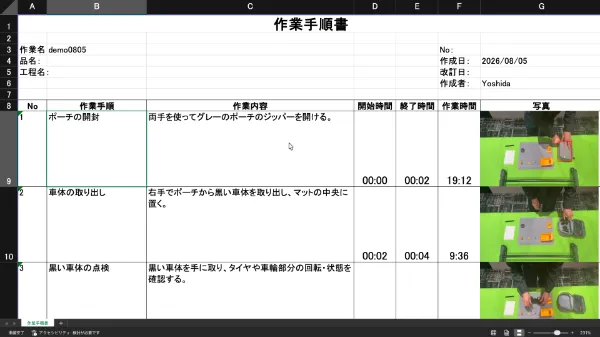
The official demo screen of Ollo Factory. This is a separate task from the unit assembly example in the text.
The decision values and dangerous areas not in the video are supplemented with the company's approved standards. After the generated procedure is confirmed and corrected by the responsible person, it is used as an educational material.
Watch Ollo Factory’s Video Manual AI in Action
About the author
K.Y. | Business Development Lead & Marketing, Ollo Inc.
K.Y. leads business development and marketing at Ollo Inc., an AI startup originating from the Matsuo Laboratory at the University of Tokyo and the developer of Ollo Factory, a work analysis AI for manufacturing.
After studying engineering and design at university, K.Y. joined a major automaker and worked on new electric-vehicle development, from design through factory production, including hands-on assembly-line training. K.Y. later worked in sales and marketing at a manufacturing startup.
Today, K.Y. helps manufacturing teams use AI to improve the way they work through Ollo Factory.
Back to articles
Related articles
See how Ollo Factory can support your factory
Book a demo
• See the product in action
• Discuss your production needs
• Explore available plans
Book a demo

Request a brochure
• Customer stories
• Key features
• How to get started
