

Published:
Manufacturing DX
6 AI Tools for Factory Work Compared

Factory AI services and work analysis tools for factories: 6 selected tools for manuals, education, and improvement | Manuals, education, and improvement comparison
This article compares 6 domestic products for factory manuals, education, and work analysis. Image inspection, equipment fault prediction, and robot control are excluded; the focus is on linking standardized work and improvement to work videos.
Ollo Factory Inc. created this based on its own function information as of November 1, 2026, and each company’s official public information. The scope of comparison and confirmation conditions are also listed directly below the table.
- 6 factory AI services and work analysis tools compared in 13 items
- Comparison point for each service characteristic
- Ollo Factory: linking procedure document creation to work difference confirmation and improvement
- tebiki field education: combining video manual and education with work analysis
- OTRS: element time measurement/comparison and form creation
- TimePrism: Measure time while viewing video, using it for task scheduling and manual creation.
- Teachme Biz: Create and operate manuals from video and materials.
- VideoStep: Turn existing materials into video for education through sharing.
- Three field environments suitable for Ollo Factory.
- 1. Field where you want to link procedure creation, actual work confirmation, and improvement.
- t110: For field wanting to consolidate analysis results into existing Excel procedures or standard work combination sheets.
- t117: For field wanting to teach newcomers using video and time specifics.
- t123: Comparison method for testing field video.
- Define the same target process and output products.
- Measure not only automated processing but also confirmation/correction.
- Confirm cost and data handling.
- Frequently asked questions in factory-oriented AI services and work analysis tools comparison.
- What is the difference between video manual tool and work analysis tool?
- Is TimePrism time aggregation and AI cycle extraction the same?
- If you want to proceed with manual creation, education, and improvement in one tool?
- Summary: Compare work beyond the manual.
- Ollo Factory: a manufacturing-specialized work analysis AI that links manual creation, education, and improvement.
- Watch Ollo Factory’s Work Analysis in Action
6 factory AI services and work analysis tools compared in 13 items
"AI decomposition of work elements" includes steps for creating manuals. Time measurement, cycle extraction, and work classification are compared in separate items. "Improvement proposal text" targets actual work methods, not manual text correction.
Comparison items | Ollo Factory | Tebiki field education | OTRS | TimePrism | Teachme Biz | VideoStep |
|---|---|---|---|---|---|---|
Creating step-by-step instructions using video | ○ | ○ | ○ | ○ | ○ | ○ |
Reading and outputting existing Excel procedure templates | ○ | Unconfirmed | To be confirmed | To be confirmed | To be confirmed | To be confirmed |
AI decomposition of work elements | ○ | ○ | ○ | Unconfirmed | ○ | Unconfirmed |
Time measurement per work element | ○ | ○ | ○ | ○ | Unconfirmed | Unconfirmed |
AI classification of work tasks within specified categories | ○ | Unconfirmed | Unconfirmed | Unconfirmed | Unconfirmed | Unconfirmed |
Comparing multiple video sequences for operation | ○ | ○ | ○ | ○ | Unconfirmed | Unconfirmed |
AI explaining work differences in text | ○ | ○ | Unconfirmed | Unconfirmed | Unconfirmed | Unconfirmed |
Automatically extracting cycles from continuous videos via AI | ○ | Unconfirmed | ○ | Unconfirmed | Unconfirmed | Unconfirmed |
Time and variance aggregation per cycle | ○ | Unconfirmed | ○ | ○ | Unconfirmed | Unconfirmed |
Comparing human and equipment operation analysis | ○ | Unconfirmed | ○ | ○ | Unconfirmed | Unconfirmed |
Creating standard work combination tickets | ○ | Unconfirmed | ○ | ○ | Unconfirmed | Unconfirmed |
AI proposing improvement suggestions in text for real work | ○ | Unconfirmed | Unconfirmed | Unconfirmed | Unconfirmed | Unconfirmed |
Posture assessment using OWAS and REBA | ○ | Unconfirmed | Unconfirmed | Unconfirmed | Unconfirmed | Unconfirmed |
Ollo Factory Inc. created this based on its own function information as of November 1, 2026, and each company’s official public information. The items were selected for manufacturing sites aiming to use video manuals and work analysis/improvement together; this is not a comprehensive evaluation of each product’s full functionality, quality, or ease of use.
○: Function confirmed via official information. Ollo Factory includes its own function information. Unconfirmed: Cannot be confirmed from the current public information; does not mean non-support. To be confirmed: Related function public information exists, but the processing scope for this comparison item must be verified. Function scope and processing volume vary depending on contract content and additional features. The number of ○ does not indicate a ranking.
Cycle extraction automation is a work element that finds the start and end of one cycle from repetitive tasks in a video using AI. OTRS pre-registers one cycle based on human-defined split criteria. tebiki’s public specification covers one cycle’s video.
TimePrism uses a method where humans split videos to measure time and aggregate/compare multiple cycles. This differs from AI-driven cycle extraction.
"Existing Excel Procedure Sheet Import/Output" compares the function of reading internal form layouts and outputting results in that format. OTRS/TimePrism data input/output and Teachme Biz/VideoStep Excel material use can be verified, but output capability within existing internal formats requires individual confirmation.
Information sources for comparison:Ollo Factory/tebiki AI features・Work analysis function/OTRS basic function・AI analysis guide/TimePrism product information/Teachme Biz AI features/VideoStep official feature guide。
Comparison point for each service characteristic
Ollo Factory: linking procedure document creation to work difference confirmation and improvement
Ollo Factory is a manufacturing-specialized work analysis AI. It creates procedure documents from videos and outputs in existing Excel format, compares the work example, and verifies time differences and movement differences.
Automatically extracting cycles from long videos and visualizing time and variability per cycle. AI classifies any work category, showing how much time is spent on component search or transport.
Also handles human-equipment parallel relationships, standard work combination sheets, improvement proposals, OWAS/REBA posture assessment. Separating procedure document creation, training, and time/physical load improvement into separate tasks. Suitable for one field from a single video.

Ollo Factory official website public demo screen. Not a process analysis of the described workflow.
Posture assessment requires different shooting scope. Try using actual videos, including decomposition/classification result correction, output, and confirmation.
tebiki field education: combining video manual and education with work analysis
Official info includes AI video editing, draft creation from procedure PDF, skill management. Work analysis includes AI decomposition of work elements, veteran vs. newcomer time/motion comparison, difference description.
Comparison candidate for combining video manual creation/training management with work analysis. Review target video conditions, analysis scope, and existing form output for field-specific tasks.
OTRS: element time measurement/comparison and form creation
OTRS publishes video element segmentation, time measurement, worker and cycle comparison, standard time calculation, and form output. In AI-assisted segmentation, a model uses a sample to analyze multiple cycles, verifying alignment and time differences.
In comparison, first create the sample, define analysis conditions, and align the scope of AI and manual operations. Separate the function for displaying numerical differences and the function for proposing written improvements.
TimePrism: Measure time while viewing video, using it for task scheduling and manual creation.
TimePrism is a task analysis and task improvement tool from Japan Shinkyo Engineering. It allows users to split tasks by clicking while playing video, then aggregate time data. Analysis data can be used for graphs, forms, and manuals.
Analysis and comparison: Time measurement of element tasks, two-screen playback comparison, aggregation and graphing of multiple cycles.
Improvement and form output: Task scheduling simulation, standard work combination forms, output to Excel and CSV.
Education: Creation of video manuals and work procedure forms using analysis data.
During comparison, separate the human task of video segmentation and classification from the software's aggregation and output processing. The current official information does not confirm AI-driven element decomposition, automatic cycle extraction, or written improvement proposal generation. Do not definitively state non-support; if prioritizing AI automation, compare the time taken by Ollo Factory and operation/confirmation for the same video.
Teachme Biz: Create and operate manuals from video and materials.
Official AI functions include creation support from video, Excel, and PDF, chat editing, search, translation, comprehension testing, and consideration of post-creation operation.
Manual improvement proposals and improvement suggestions for work operations and equipment layout have different targets. If time analysis of actual work is required, confirm the scope separately.
VideoStep: Turn existing materials into video for education through sharing.
VideoStep includes AI transcription, subtitle generation, AI voice, multilingual translation, and automatic generation of video manuals from existing PowerPoint or Excel procedure sheets. It supports smartphone/tablet viewing, offline playback, and confirmation of viewing logs and test-based education.
When comparing, separate the function for video conversion from existing materials and the function for analyzing filmed operations to show time differences and improvement proposals. If video creation for education is not enough, but time measurement and cycle analysis are required, confirm the scope using field videos.
Three field environments suitable for Ollo Factory.
1. Field where you want to link procedure creation, actual work confirmation, and improvement.
Ollo Factory generates procedures and explanatory text from work videos, supporting manual creation. Use the created procedures for education, compare actual work to the sample, and reflect improved content in the next procedure.
Create: Organize steps from video to reduce written instructions.
Verify: Compare example and actual work to identify time gaps and differences.
Improve: Review work methods based on category-specific time variability and AI improvement suggestions.

Compare: View video and generated steps to confirm/revise part names and work divisions screen. Published image is from public demo, not unit assembly analysis.
t110: For field wanting to consolidate analysis results into existing Excel procedures or standard work combination sheets.
t111: Even with faster analysis, transcribing to new forms remains labor; Ollo Factory reads existing Excel format and outputs steps in same format, including standard work combination sheet output.
t112: For using in-house format to consolidate photos, work steps, and notes for unit assembly; confirm output in actual file for unique cells or complex forms.

t114: Example of consolidating work video analysis into Excel procedure sheet to reduce burden of separate video and form creation.
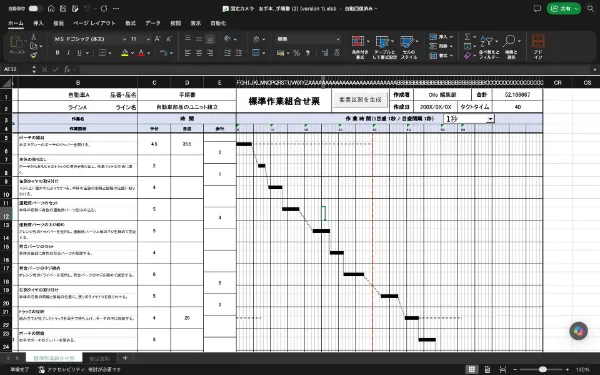
t116: Example of standard work combination sheet organizing manual, walking, and equipment time on same timeline to check overlaps and waiting time. All are explanation output examples, not unit assembly measurement results.
t117: For field wanting to teach newcomers using video and time specifics.
t118: Distributing steps alone doesn't reveal where newcomers struggle; Ollo Factory links example video as comparison object to detect time gaps and motion differences.
t119: If searching/transferring actions increase before attaching parts, teach using video scene while showing part placement and grip order; suitable for manual creation and mastery confirmation using same video.

t121: Fujitsu deployment comparison analysis screen showing example: align example video and comparison video to check time differences and delays; Fujitsu uses IE training, Fujitsu equipment control blow-up factory uses work analysis and video manual creation with Ollo Factory.t122: View Fujitsu deployment example.
t123: Comparison method for testing field video.
t124: Uploading video doesn't equal analysis capability; verify which features automate AI subtitles, step generation, time measurement, cycle detection.
Create: Can you generate and update standard operating procedures from videos or existing documents for use at the workplace?
Teach: Can you not only share procedures but also verify differences with a model example?
Improve: Can you analyze time, variability, human-equipment relationships, posture, etc.?
For sites that use the manuals you created for education, and analyze subsequent work to update, it is important to link these three stages for comparison.
Define the same target process and output products.
For unit assembly, define outputs such as filming component sets, fastening, extraction/inspection, creating one standard procedure document, comparing two operators, observing variability in continuous cycles.
Posture evaluation requires full-body assessment; hand-level action comparison requires a viewing angle where the object is visible. Conditions vary. Confirm filming requirements for each service; do not force the same angle for all applications.
Measure not only automated processing but also confirmation/correction.
Measure pre-upload cutting, preparing a model example, post-analysis segment correction, confirming descriptions, generating invoices. Comparing only AI processing time does not reveal the number of actual operators.
Evaluate content. | Confirm method. |
|---|---|
Can it be used as a standard procedure document? | Align sequence, component name, precautions, approved conditions. |
Can analysis be used to improve? | Confirm video review in cases of time differences or delays. |
Continue in normal operations? | Confirm burden of updating, confirming, education, and permission management. |
Confirm cost and data handling.
In addition to initial cost and usage fee, estimate required additional features, analysis volume, video length, base, account, output conditions. Confirm video storage, access rights, learning use, deletion, data extraction after contract end.
Frequently asked questions in factory-oriented AI services and work analysis tools comparison.
What is the difference between video manual tool and work analysis tool?
Comparison points are creation/sharing/education management and time measurement/action comparison/work scheduling. Do not distinguish only by product name; confirm the required outputs. Detailed features areVideo manual creation tool comparisonAndWork analysis software comparisonAlso explained.
Is TimePrism time aggregation and AI cycle extraction the same?
No. TimePrism can aggregate and compare time for segmented tasks while watching a video. AI automatic cycle extraction identifies the start/end of one work cycle automatically from continuous video. Not recognizing aggregation table creation alone as automation; verify preset and manual operation ranges.
If you want to proceed with manual creation, education, and improvement in one tool?
Try creating a standard procedure document from the same assembly video and existing invoices, comparing a model example, confirming improvement proposals, generating invoices. Ollo Factory is for sites that want AI support for this entire sequence. Judge by functionality count and burden of finishing in a usable state at the workplace.
Summary: Compare work beyond the manual.
Confirm captioning, proceduralization, time measurement, and action comparison as separate functions.
If education and improvement are needed, cycle, classification, ledger, posture assessment are also compared.
For the same challenge in the field, determine the labor hours and operational conditions including trial, confirmation, and correction.
Linking procedural document creation and work analysis allows for distributing the created manual and verifying the actual work and updating it. When expanding the use of AI, quality and safety judgments are aligned with field approval conditions.
Ollo Factory: a manufacturing-specialized work analysis AI that links manual creation, education, and improvement.
With Ollo Factory, you can create procedural documents from videos and output them to existing Excel formats. Furthermore, you can utilize comparison with a model, automatic cycle extraction, variability, time analysis by category, improvement suggestions, and standardized work combination vouchers.

Video manual creation, comparative analysis, operational analysis, improvement suggestions, posture assessment can be combined and utilized according to field challenges.
Ollo Factory is used byNissan Motor CorporationandSuzuki Motor Corporationamong other automobile manufacturers. For customer-specific deployment scope and results, please refer to their respective public examples.
To reduce manual work for manual creation and verify if the procedure is being followed, and for those who wish to proceed to field improvement, Ollo Factory is recommended.
Watch Ollo Factory’s Work Analysis in Action
About the author
K.Y. | Business Development Lead & Marketing, Ollo Inc.
K.Y. leads business development and marketing at Ollo Inc., an AI startup originating from the Matsuo Laboratory at the University of Tokyo and the developer of Ollo Factory, a work analysis AI for manufacturing.
After studying engineering and design at university, K.Y. joined a major automaker and worked on new electric-vehicle development, from design through factory production, including hands-on assembly-line training. K.Y. later worked in sales and marketing at a manufacturing startup.
Today, K.Y. helps manufacturing teams use AI to improve the way they work through Ollo Factory.
Back to articles
Related articles
See how Ollo Factory can support your factory
Book a demo
• See the product in action
• Discuss your production needs
• Explore available plans
Book a demo

Request a brochure
• Customer stories
• Key features
• How to get started
