

Published:
Training & Standardization
How to Create Manufacturing Work Instructions with AI

Create a work instruction using generative AI by entering the task details and reference materials, then issuing the creation instructions to generate a draft. The field is reviewed and corrected by the field staff before distribution.In manufacturing, even if the text is natural, the component orientation, work sequence, and quality verification conditions must match reality; otherwise, it cannot be used.For the field, address the scope of delegating to AI, the information to prepare, specific instructions, and verification methods. The work example is the assembly of an automotive component unit. The example is for illustration only; the actual process conditions align with the field’s approved documents.
Benefits and drawbacks of creating work instructions with generative AI
- Creating work instructions with generative AI has the following benefits and drawbacks.
- Generative AI can be used for summarizing notes into text or organizing information according to specified items. AI services that accept video input can segment the work into steps and generate explanatory text. The input materials, videos, and output formats vary by service; confirm beforehand.
- 1. Provide information to AI
- Before entering information into AI, gather the following:
- 2. Give the AI instructions and generate a draft
- 3. Review and correct the created procedural document.
- Three problems that can easily occur when relying solely on a general AI.
- Frequently asked questions about creating procedural documents with AI.
- Can it be completed solely by AI?
- Can the Excel procedural document be continued to use?
- Can documents containing confidential information be input?
- Summary: Confirm AI drafts against field standards and complete them.
- Ollo Factory, a manufacturing-specialized work analysis AI that automates procedure draft creation from work videos.
- Watch Ollo Factory’s Video Manual AI in Action
Creating work instructions with generative AI has the following benefits and drawbacks.
Benefits
Drawbacks | Reduce the number of work elements that need to be created |
|---|---|
Risk of containing incorrect information | Standardize composition and expression by using common instructions and templates |
Risk of information leakage | Create explanation candidates for organizing and rephrasing based on approved documents |
Risk of unnatural expression | Tasks that can be delegated to AI for creating work instructions |
Generative AI can be used for summarizing notes into text or organizing information according to specified items. AI services that accept video input can segment the work into steps and generate explanatory text. The input materials, videos, and output formats vary by service; confirm beforehand.
Tasks
Scope of AI use | Verification | Draft from video |
|---|---|---|
Segmenting the work and creating operational descriptions | Segmenting, component names, hidden operations | Referencing existing documents |
Reflecting terminology, conditions, and formatting in the draft | Mismatch between document version and video | Formatting into Excel |
Placing information in the designated sheet of the ledger | Column alignment, photos, page turning | Input of materials to AI is done to prompt the necessary information. Providing materials is not the same as retraining the AI model. Confirm the service’s storage and learning usage settings, as well as internal input rules. |
3 Steps to create a work instruction from generative AI
1. Provide information to AI
Before entering information into AI, gather the following:
Target work: product handled, work scope, actual work video, and notes
Confirmation conditions: approved precautions, quality and safety standards
Reference materials: latest version of the work instruction and output format
Filter the materials to include only content related to the target work, confirming accuracy and version. Verify whether PDF, Excel, and video inputs are supported by the service.
2. Issue creation instructions to AI and generate the draft
2. Give the AI instructions and generate a draft
After entering the required information, instruct the AI to create the procedural document. The questions or instructions entered are called "prompts." Specifying the reader, output items, and precautions in detail makes it easier to create a draft suitable for the purpose. If the output is insufficient, convey additional information or correction instructions to adjust it. Below is an example for creating a draft from a work memo.
Based only on the attached work memo, create a draft procedural document for the assembly procedure of automobile parts units. The reader is a new worker. Organize into four columns: "Yes/Work Procedure/Work Content/Precautions." Do not infer component names, numbers, or judgment conditions not in the document; instead, indicate "to be confirmed."
3. Review and correct the created procedural document.
The procedural document generated by the AI may contain facts inconsistent content or interpretation differences with the document. After creation, verify the work sequence, component and tool names, quality and safety conditions, and correct errors or omissions. Have other personnel, other than the creator, review it to reduce omissions. Furthermore, have the procedural document reader explain the work approach and verification points in their own words; this makes it easier to find insufficient explanations. When testing in actual operations, conduct it only if it meets the qualifications, education, and supervision conditions established within the company. After confirmation and correction, distribute it in accordance with the company's approval procedure and manage it so as not to mix with the old version.
Three problems that can easily occur when relying solely on a general AI.
First,Fill in unstated conditions in the most plausible manner.This. Leave unconfirmed matters as blank spaces or "to be confirmed" and do not adopt values without basis.
Second, the format and detail level of the generated output may vary with each generation. Use common templates and glossaries, and standardize the output items. If generating text and formatting Excel sheets separately, compare the workload including transcription time.
Third, adopting the work shown in the video as the procedure without modification may occur. If the shown work differs from the approved procedure, verify the reason. It is important to distinguish and manage the recorded work, improvement proposals, and approved procedures.
The method for creating a draft procedure from the video and outputting it in the Excel format used in the field is introduced in Ollo Factory's product materials.
Frequently asked questions about creating procedural documents with AI.
Can it be completed solely by AI?
Drafting and formatting the format can be automated. However, conditions not shown in the video or whether it can be safely implemented in the actual field require human verification. Evaluate the introduction effect not only by the number of procedures that can be created but also by the time required for revision, review, and distribution.
Can the Excel procedural document be continued to use?
If the product can output to existing forms, the format can be used. Confirm the corresponding forms, handling of photos and combined cells, and editing methods after output using actual forms.
Can documents containing confidential information be input?
Verify internal rules and service contracts/settings before deciding. If not approved, begin with a mock dataset for form and instruction validation.
When combining photos and descriptions to compile a procedure manual,How to create a work procedure manual and Excel templateYou can view methods for filling each column and proceeding with confirmation.
Summary: Confirm AI drafts against field standards and complete them.
Define target tasks and audience, then gather videos and approved reference materials.
Specify task boundaries, descriptions, and formats, then have AI generate a draft procedure.
Cross-check part names, precautions, and quality/safety conditions, then distribute after approval.
Define the scope for AI to automate procedure transcription and description generation. Linking from video analysis to output formats for internal use reduces transcription and formatting burdens.
Ollo Factory, a manufacturing-specialized work analysis AI that automates procedure draft creation from work videos.
Ollo Factory is a manufacturing-specialized work analysis AI provided by Ollo Co., Ltd.Video Manual AIUpload videos to automatically split work videos, generate work titles, and descriptions.

Official demo screen. You can integrate videos and work procedures for confirmation. This is a separate task from the unit assembly example in the text.
There is also a function to analyze results in a format that reads your company’s Excel invoices, referencing existing procedure manuals. This reduces transcription and formatting after generating text with a general AI, enabling shared invoice usage within the company.
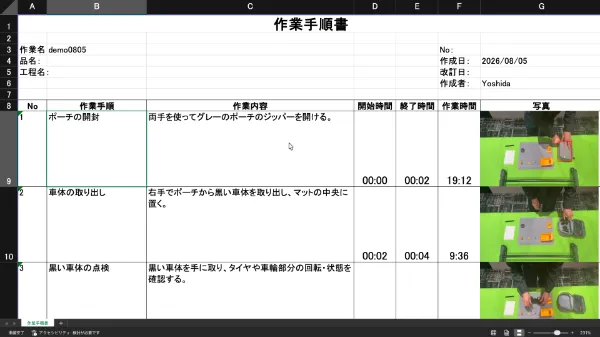
Official demo Excel output example. The invoice used is different from the distribution format described in the text.
The generated procedure is reviewed by the responsible party for part names, precautions, and approved quality/safety conditions.For manufacturing sites that want to create a procedure draft from videos, expand across multiple processes, and ensure technical knowledge transfer, consider Ollo Factory. Functionality and usage methods can be verified in the following materials., consider Ollo Factory. Its brochure explains the available functions and practical use cases.
Watch Ollo Factory’s Video Manual AI in Action
About the author
K.Y. | Business Development Lead & Marketing, Ollo Inc.
K.Y. leads business development and marketing at Ollo Inc., an AI startup originating from the Matsuo Laboratory at the University of Tokyo and the developer of Ollo Factory, a work analysis AI for manufacturing.
After studying engineering and design at university, K.Y. joined a major automaker and worked on new electric-vehicle development, from design through factory production, including hands-on assembly-line training. K.Y. later worked in sales and marketing at a manufacturing startup.
Today, K.Y. helps manufacturing teams use AI to improve the way they work through Ollo Factory.
Back to articles
Related articles
See how Ollo Factory can support your factory
Book a demo
• See the product in action
• Discuss your production needs
• Explore available plans
Book a demo

Request a brochure
• Customer stories
• Key features
• How to get started
