

Published:
Work Analysis
How to Assess Working Postures with the OWAS Method

Retrieving items from low component bins, twisting the body to set fixtures, etc., involve strenuous postures in assembly work. One method for deciding which situation to improve is the OWAS method, which classifies work posture.
The OWAS method uses a 4-digit code to represent back, arm, leg, and load, and is an observational method to confirm the need for improvement using a rating sheet. This article explains the code reading, observation and recording procedures, and comparison methods before and after improvement using the Ollo Factory as an example.
- What is the OWAS method? A technique for prioritizing improvement based on posture.
- 4-digit code and AC are separate information.
- Six-step process for OWAS observation
- 1. Define the target task and period
- 2. Record with full body and object visibility
- 3. Define observation intervals and adoption rules
- 4. Separate posture and load confirmation
- 5. Match codes to evaluation table
- 6. Evaluate improvements and confirm under same conditions
- Unit assembly recording example
- Do not confuse the evaluation of a single posture with the aggregation of the entire work.
- Items to record before and after improvement
- Frequently asked questions
- Can evaluation be done with a single photo?
- What is the difference between REBA and other methods?
- Summary: Classify posture and load, then determine the need for improvement.
- Ollo Factory: A manufacturing-specialized work analysis AI that automates video posture analysis and candidate organization.
- ① Confirm posture evaluation candidates from video.
- ② Confirm code and analysis conditions.
- Watch Ollo Factory’s Ergonomic Assessment AI in Action
What is the OWAS method? A technique for prioritizing improvement based on posture.
OWAS is a posture evaluation method developed in Finland.The "New Work Posture Monitoring System" developed by the Agricultural Research Institute.However, the method describes recording the body trunk, arm, leg, and load in 4 digits and evaluating it using 4 action categories.
This Agricultural Research Institute document is a 2005 research result and an example of applying OWAS to posture analysis. It should not be treated as a legal standard or a diagnostic document for individual health conditions.
Combine the numbers for back, arm, leg, and load to create a 4-digit posture code. Then, match the code to the OWAS rating sheet and check AC1–AC4. Separate the posture classification and the AC representing the need for improvement for recording.
OWAS aids work comparison and identifying improvement areas, but may not adequately represent fine finger movements, neck or wrist conditions, vibration, repetition frequency. Combine with other assessments or specialized verification based on the challenge.
4-digit code and AC are separate information.
Code and AC should be read as follows.
Code:4-digit classification representing back, limbs, lower limbs, and load.
AC:Evaluate code combinations against the checklist to confirm improvement need.
Judgment caution:Do not determine overall AC based on a single body part.
Code position. | Observed items. | Confirm in records. |
|---|---|---|
First digit. | Back. | Distinguish upright, forward bend, twist, and forward bend with twist combinations. |
Second digit. | Arm. | Confirm number of arms above shoulder level. |
Third digit. | Leg. | Distinguish support state, knee flexion, sitting/walking. |
Fourth digit. | Load. | Confirm handled weight and record corresponding classification. |
Combining back (4), arm (3), leg (7), load (3) gives 252 combinations. Match with classification table and avoid assigning numbers based on visual impression alone.
Digit-to-category mapping as follows. Classification diagram and AC evaluation table are published by Tokyo Labor Bureau.Confirm in "Figure 2-11 OWAS method as risk assessment example" (pages 59–60).Digit-part.
Code-posture. | Code and posture. |
|---|---|
First digit: back. | 1 = straight, 2 = forward/backward bend, 3 = twist/side bend, 4 = twist with combined forward/backward and side bend. |
Second digit: arms | Second digit: arm. |
Third digit: legs (1–3) | 1 = sit, 2 = stand with both legs extended, 3 = place weight on one leg and stand with that leg extended |
Third digit: legs (4–7) | 4 = stand with both knees bent and in a low position, 5 = low position with weight on one leg, 6 = kneel with either knee or both knees, 7 = walk |
Fourth digit: load | 1 = 10kg or less, 2 = 10kg to 20kg, 3 = over 20kg. Weight and force conditions should match the evaluation documents used |
The load column in the reference includes overlapping labels "10kg or less" and "10–20kg", so here 10kg is coded as 1. Standardize boundary operation for recording. Verify actual weight and work conditions.
AC1 is a category where OWAS requires no improvement measures. AC2 is to be addressed in the near future, AC3 as soon as possible, AC4 immediately. However, even AC1 may involve long-term holding, repetition, vibration—other burden factors—so verify them. Do not treat AC as a safety certification.
Six-step process for OWAS observation
1. Define the target task and period
For unit assembly: "take parts from supply box and set them on fixture" determines what to observe. If periodic cycles, part supply and staging are included, split the segment for recording. Consolidate part number, equipment, layout, observation range.
2. Record with full body and object visibility
Create a viewing angle where back, arms, legs are visible and the object and work position are confirmed. In cases where body is obscured by equipment, do not infer—label as "unclassifiable". Use additional angles if needed.
3. Define observation intervals and adoption rules
In OWAS, observe postures at predetermined intervals and determine the occurrence rate of each posture. If observation intervals overlap with work cycles, only recurring postures may be captured—review multiple cycles to set observation conditions. Postures appearing only briefly should be recorded separately from regular interval aggregation. Record interval, count, segment area, and conditions before and after improvement.
4. Separate posture and load confirmation
From video, observe back, arms, legs; confirm load via object records. Do not infer weight from visual appearance. For ambiguous postures, have evaluators reconcile; retain classification criteria used.
5. Match codes to evaluation table
After aligning four digits, verify AC. Do not base AC solely on partial body state or load. Even with automated parsing, revisit video for representative and ambiguous scenes.
6. Evaluate improvements and confirm under same conditions
Identify which tasks show high AC. Assess part box height, supply position, fixture access. After changes, re-observe with same part number, load, work range. Verify quality and whether burden shifts to other postures.
Unit assembly recording example
This is a model to explain how to read the evaluation sheet. It is not the result of analysis in the actual field or at Ollo Factory. Assuming the weight of the object is 5kg, two postures are matched with the OWAS evaluation sheet.
Scene | Observed state | Code | AC on the evaluation sheet | Confirm and consider |
|---|---|---|---|---|
Hold the part in front of the fixture | Back is upright, both arms are below the shoulder, both legs are extended and evenly supported, load 5kg | 1121 | AC1 | Confirm other burdens and repetition and holding time for this posture |
Take from the low supply box | Back is bent forward, both arms are below the shoulder, both legs are extended and evenly supported, load 5kg | 2121 | AC2 | Consider the height and position of the box, and maintain component matching and misidentification prevention even after change |
Even if the low box is raised, a posture where arms are raised high or vision is obstructed may create a new challenge. Let's confirm the AC change and ease of work together.
For example, the posture of taking a 5kg part from a low box is "bent forward = 2/both arms below the shoulder = 1/both legs extended and standing = 2/load 5kg = 1", resulting in 2121. On page 60 of the evaluation sheet above, the value where the row for back 2 and upper limbs 1 intersects the column for lower limbs 2 and weight 1 is 2, so AC2 is recorded. If the leg or load conditions change, the evaluation may change even with the same bent posture, so re-check.
The record is organized in the order of "work scene", "observed posture", "confirmed load", "4-digit code", "AC on the evaluation sheet", and "improvement proposal". Even after improvement, observe the same area and confirm the posture change and ease of work.
To optimize work posture analysis, you can also use AI that uses videos. The evaluation method and shooting conditions are introduced in Ollo Factory's product materials.
Do not confuse the evaluation of a single posture with the aggregation of the entire work.
A single AC image does not indicate how often it occurs during the work. In aggregation, separate the total number of observations, the number of judgments, the number of non-judgments, and the number of occurrences of each code or AC.
For example, if 50 observations are made, 48 judgments are possible, and 2 are non-judgments, the occurrence rate of each AC is stated as "the observation rate based on the denominator of the 48 possible judgments". If non-judgments are biased toward a specific work, aggregation may also be biased. To read the observation rate as a work time percentage, you must confirm whether the target area and observation interval are appropriate.
AC is a classification indicating the need for improvement. Do not treat the average of AC1 and AC3 as AC2, or compare different load and observation range results to determine improvement effects.
Items to record before and after improvement
Work name, part number, equipment and arrangement, load confirmation source, shooting conditions, observation method, classification criteria, evaluator. If the speed or order of work changes after improvement, record the condition difference.
The improvement proposal does not end with "raise the part box"; define the installation position, handling during supply, component matching, interference, and the person responsible for confirmation on site. Safety-related judgments must be confirmed with the on-site manager or specialized personnel.
Frequently asked questions
Can evaluation be done with a single photo?
You can match codes for visible posture and confirmed load, but this alone cannot evaluate the overall workload or occurrence rate. Verify multiple scenarios and conditions.
What is the difference between REBA and other methods?
Select based on required evaluation items. If body parts or fine conditions cannot be expressed in OWAS, consider other methods. Do not add or average scores from different methods as a single number; interpret each definition separately.
Summary: Classify posture and load, then determine the need for improvement.
Observe the work and methods, record posture, limbs, lower limbs, and load.
Match the 4-digit code to the evaluation table and retain AC and observation conditions.
Do not confirm safety solely from results; consider the site conditions and other evaluations together for improvement.
Use AI for extracting posture from video and organizing evaluation candidates. Reduce recording burden while having the responsible person confirm hard-to-see posture or load conditions.
Ollo Factory: A manufacturing-specialized work analysis AI that automates video posture analysis and candidate organization.
① Confirm posture evaluation candidates from video.
Analyze posture from video without markers, confirming OWAS and REBA evaluations. Set full-body visible shooting conditions and return to the area where burden posture appears for confirmation.
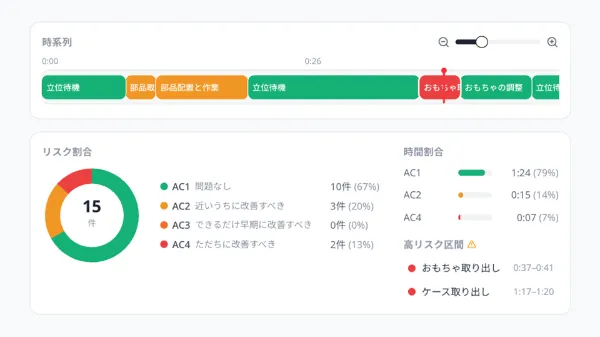
Ollo Factory official demo screen. This is a different task from the unit assembly example in the text.
② Confirm code and analysis conditions.
In the result detail, you can check posture codes and loads. Confirm loads with real-object information and adjust manual settings as needed. Do not think that video alone can accurately automatically determine weight.
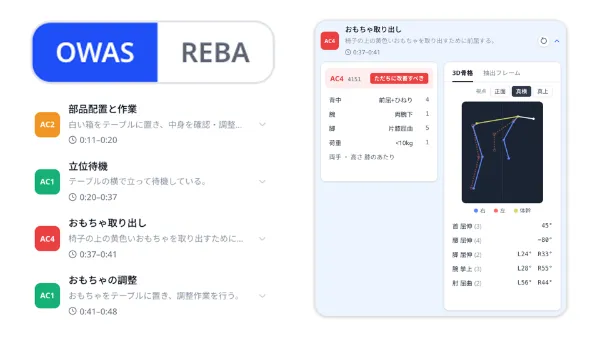
Ollo Factory official demo screen. This is a different task from the unit assembly example in the text.
AI evaluation is a confirmation material, not a health diagnosis or safety certification. Match hard-to-see posture, classification, and load conditions, and discuss improvement with the specialist and site manager.
Watch Ollo Factory’s Ergonomic Assessment AI in Action
About the author
K.Y. | Business Development Lead & Marketing, Ollo Inc.
K.Y. leads business development and marketing at Ollo Inc., an AI startup originating from the Matsuo Laboratory at the University of Tokyo and the developer of Ollo Factory, a work analysis AI for manufacturing.
After studying engineering and design at university, K.Y. joined a major automaker and worked on new electric-vehicle development, from design through factory production, including hands-on assembly-line training. K.Y. later worked in sales and marketing at a manufacturing startup.
Today, K.Y. helps manufacturing teams use AI to improve the way they work through Ollo Factory.
Back to articles
Related articles
See how Ollo Factory can support your factory
Book a demo
• See the product in action
• Discuss your production needs
• Explore available plans
Book a demo

Request a brochure
• Customer stories
• Key features
• How to get started
