

公開日:
Manufacturing DX
4 Work Analysis Software Tools for Manufacturing Compared

Choosing a work-analysis software means not only measuring video time, but also determining how much classification, comparison, form creation, and education integration can be delegated. The function set varies depending on whether you want to reduce analysis effort, standardize standard work, or use it for new employee training.
This article compares four domestic work-analysis software products across 13 items. In addition to video analysis, AI classification, time aggregation, standard work combination forms, improvement suggestions, and education integration, it presents a selection method tailored to field objectives.
Ollo Inc. created this content based on its own feature information as of October 29, 2026, and the official public information from each company.
- Comparing four work-analysis software products across 13 items.
- Features and differences of 4 work analysis software products
- Ollo Factory | For fields aiming to move from AI analysis to improvement, standardization, and education.
- OTRS | Comparison candidate for detailed time measurement, work scheduling, and form creation emphasis.
- TimePrism | Comparison candidate for situations where humans analyze videos while assembling improvement proposals.
- tebiki: Combining video-based training and AI work analysis
- 1. Field environments aiming for improvement, manual creation, and education using a single tool
- Ollo Factory enables progression from task video analysis to reviewing improvement proposals, manual creation, and new employee education. Utilization of analysis results in materials and education supports solidification of improved tasks in the field.
- 2. Create standardized work combination tables and work instructions from analysis results
- 3. For environments where improved procedures need to be established for new employee education.
- For cost comparison, estimate the same business scope.
- Common questions when comparing work analysis software
- Does AI automatically determine standard time when measuring work duration?
- What should be considered when comparing Ollo Factory and other vendor products for final decision-making?
- Summary: Select work analysis software by comparing post-analysis applications
- Manufacturing industry-specific AI "Ollo Factory" for automating work analysis and procedure creation
- Watch Ollo Factory’s Work Analysis in Action
Comparing four work-analysis software products across 13 items.
Work-analysis software is a tool for dividing work videos into elements and comparing required time and action differences. First, compare the analysis method and its applicability to results.
Divide the analysis flow into "measuring and classifying," "comparing and improving," "standardizing and using for education," and compare AI processing with human-set and measured data aggregation.
Comparison items. | Ollo Factory | OTRS | TimePrism | tebiki |
|---|---|---|---|---|
Automatically splitting videos into work elements using AI. | ○ | ○ | Unconfirmed. | ○ |
Time measurement and aggregation for each work element. | ○ | ○ | ○ | ○ |
Automatic classification of work into predefined categories (direct, incidental, waste, etc.). | ○ | Unconfirmed. | Unconfirmed. | Unconfirmed. |
Graphing of work time and composition ratios. | ○ | ○ | ○ | ○ |
Comparison of model and before-and-after videos. | ○ | ○ | ○ | ○ |
AI-automatic extraction of cycles from continuous work videos. | ○ | ○ | Unconfirmed. | Unconfirmed. |
Confirmation of time differences and variability for repetitive work. | ○ | ○ | ○ | Unconfirmed. |
Analysis for multiple workers. | ○ | ○ | ○ | Unconfirmed. |
Human-machine cooperative work analysis. | ○ | ○ | ○ | Unconfirmed. |
AI-generated problem points and improvement proposals. | ○ | Unconfirmed. | Unconfirmed. | Unconfirmed. |
3D skeleton and OWAS/REBA posture evaluation. | ○ | Unconfirmed. | Unconfirmed. | Unconfirmed. |
Creation and output of standard work combination forms. | ○ | ○ | ○ | Unconfirmed. |
Creation of procedure manuals and education materials from analysis results. | ○ | ○ | ○ | ○ |
Ollo Inc. created this content based on its own feature information as of October 29, 2026, and the official public information from each company. The item selection assumes a manufacturing site that wants to combine video manual creation and work analysis/improvement. This is not a comprehensive evaluation of each product’s full functionality, quality, or ease of use.
○: Confirm function via official information. Unconfirmed: Not verifiable in the current public information, which does not imply non-availability. Function usage scope and processing volume vary depending on contract terms and additional features.
Reference source for comparison table (each company official).
TimePrism:Product information.
tebiki:AI work analysis.
"Automatic cycle extraction" is a function that enables AI to find the start and end of one work cycle from multiple repetitive videos. This is distinct from element division for procedure manual creation. OTRS requires prior registration of a standard cycle. tebiki’s public specification applies to one cycle’s video.
Some products allow human pre-division and classification even if they support aggregation and comparison; comparing operation and confirmation time from the same video for field results reveals differences.
Ollo Factory enables AI-driven division and classification to connect to outputting standard work combination sheets and procedure manuals, as well as comparing examples.Recommended for field environments aiming to reduce measurement and transcription while using analysis results for improvement and education.
The dividing line for comparison is not just "time measurement," but whether analysis can link to required work after analysis. Establishing standard time requires measuring time, evaluating work conditions, work speed, and handling slack; AI-generated times cannot be directly adopted as the field standard time.
Features and differences of 4 work analysis software products
Ollo Factory | For fields aiming to move from AI analysis to improvement, standardization, and education.
Ollo Factory is a work analysis AI specialized in manufacturing; it divides procedures based on video motion and supports task classification and improvement proposal creation; classification criteria defined by the company, human-machine operation, and work posture can also be analyzed; analysis results can be used for procedure manuals and education.
Ollo Factory's Cycle Detection AI automatically extracts repeating cycles from long videos of multiple operations; visualize cycle duration and variability per cycle and link to comparative analysis; for example, continuously filming unit assembly to review long-duration cycle footage and examine differences in work.
Analysis and Improvement: Check element work time and classification, then review problematic situations and improvement proposals.
Standardization: Create procedure manuals from work videos and existing materials, outputting to familiar Excel formats or standard work combination sheets.
Education: Compare example videos with new employee videos to confirm time differences and differences in actions for tasks with significant time gaps.
For example, in automobile component unit assembly where tool search time before fastening is long, confirm the situation in the relevant scenario, improve the layout, and reflect the revised procedure in education; suitable for field improvement and education managers who want to use the same work video to proceed with discussions.
OTRS | Comparison candidate for detailed time measurement, work scheduling, and form creation emphasis.
OTRS is a software that handles video-based work measurement, work scheduling, and standard work form creation; features include rating input, before-and-after comparison, manual creation; usage scope varies depending on contract content.
AI function: Automatically split multiple cycles based on one cycle of criteria divided by humans.Operational matching for standard work and measuring repeating work.Product for those seeking compatibility with Ollo, including measurement and form requirements, plus AI-generated improvement proposals and use of existing procedure manuals; compare the workload of the responsible party when comparing with Ollo, including measurement, form, AI improvement proposals, and existing procedure manuals.
TimePrism | Comparison candidate for situations where humans analyze videos while assembling improvement proposals.
TimePrism is configured to split tasks while watching videos, registering classifications and insights. Improvement considerations can be made using aggregation graphs, comparative playback, and task organization features. The function also allows for creating manuals from analysis results.
The operation allows comparison with the practice where the responsible person confirms task segmentation and classification while building analytical evidence.The official page also presents network-disconnected usage and one-time purchase options. When prioritizing AI-driven automation, comparing the operations required for splitting, classifying, and documenting the same video in Ollo makes differences easier to understand.
tebiki: Combining video-based training and AI work analysis
In addition to video work instructions and training management, tebiki offers AI work analysis. It can segment tasks into work elements, visualize durations, and compare movements in two videos.
This product is a comparison option when aligning education infrastructure and task analysis. The official task analysis guide includes conditions such as one video per person and one cycle, and setting usage counts. When comparing with Ollo, ensure alignment of actual video length, number of people, monthly analysis volume, and verify required outputs and improvement suggestions.Ollo Factory suitable for 3 field environments
1. Field environments aiming for improvement, manual creation, and education using a single tool
Ollo Factory enables progression from task video analysis to reviewing improvement proposals, manual creation, and new employee education. Utilization of analysis results in materials and education supports solidification of improved tasks in the field.
Improve:
Classify tasks using AI to visualize waste and variability. Reassess task methods and arrangements based on AI-proposed improvement suggestions. Create a manual:
Generate procedures and explanatory text from videos, compiling them into video manuals or existing Excel formats. Use for education:
Compare a model and a new employee's work to check time differences and missed tasks. Clearly communicate what to practice. For example, if the time spent searching for parts during unit assembly is long, revise part placement and document the revised procedure in a manual. Confirm compliance with the model's video comparison through a continuous workflow.
Ollo Factory's operational analysis screen displaying time consumption and composition ratios per task classification in a graph

2. Field environments aiming to create standard work combination sheets and procedural documents from analysis results
2. Create standardized work combination tables and work instructions from analysis results
In environments where existing Excel forms are used, transferring output data to a different format also becomes a standard work element to compare. Ollo Factory reads existing templates and outputs procedures in that format. It supports outputting standard work combination forms, reducing the burden of re-entering procedures and times into another form.
For example, using the method of organizing unit assembly photos, procedures, and notes into the company's existing columns and outputting.For situations where analysis speeds up but form creation remains a challenge, we want to solve this together.Suitable for. For complex forms, please confirm output in real-life situations.
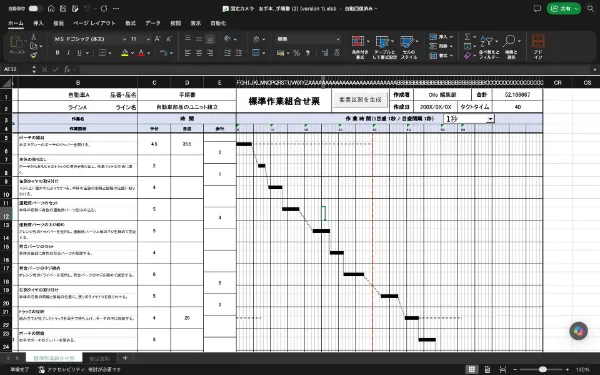
Example of outputting analyzed procedures and times to Excel's standard work combination form, organizing manual work, walking, and equipment operation on a timeline, allowing for identification of overlapping work and waiting time. The published image is a demo output example.

Example of outputting photos, work procedures, notes, and times from a work video to Excel, consolidating them. It can be output in accordance with the existing format, allowing for reduced creation time while utilizing the procedure book used in the field.
3. For environments where improved procedures need to be established for new employee education.
After creating standard procedures, it is necessary to confirm whether the work can be performed exactly as specified. Ollo Factory's comparative analysis allows for linking two work videos, confirming time differences and differences in action.
If new employees are confused before installing parts, you can guide them by viewing that situation together, instructing on how to place the parts and the order in which to hold them.For situations where the results of analysis and standardization need to be delivered to field education.We recommend Ollo Factory for this.
Ollo Factory compares the flow of individual function presence/absence, analyzing in line with field standards, organizing teaching procedures, and confirming real work.Comparing by flow.Comparing by flow.

Fujitron's implementation case, publicly released comparative analysis screen. Aligning the model and comparison video, confirming the difference in work time and the situation where delays occurred. Fujitron uses Ollo Factory for IE training, Fujitron equipment control at the blow-up factory for work analysis and video manual creation. View Fujitron's implementation case.
For cost comparison, estimate the same business scope.
When comparing the price of work analysis software, compare the basic fee not only with the functions used and the processing volume. If AI analysis and comparative features are part of an additional contract, the total amount including manual creation will change.
Scale of use: Site, user, video length, monthly analysis volume.
Function range: AI analysis, comparison, form output, procedure book creation, education management.
Remaining labor: Division/classification correction, content confirmation, form shaping, update.
Ollo Factory pricing is provided based on usage purpose and scale, with individualized proposals. When comparing cost with the effort to convert analysis into field materials, the cost-effectiveness after implementation becomes easier to assess.
Common questions when comparing work analysis software
Does AI automatically determine standard time when measuring work duration?
Measurement time and standard time are separate. Standard time setup requires target tasks, work conditions, rating, and buffer rates. Product-specific items and forms differ, so verify if the calculation method aligns with field practices.
What should be considered when comparing Ollo Factory and other vendor products for final decision-making?
Using the same assembly video and existing forms, the analysis results are adjusted to become usable for improvement review, procedure documentation, and training until the required state is achieved. Ollo Factory supports this sequence of tasks with AI. Prioritize field deliverables and operator burden over the number of feature names.
Summary: Select work analysis software by comparing post-analysis applications
Work analysis software must confirm video segmentation, time measurement, classification, comparison, form creation, and training use. Separate the scope for AI to handle and the scope for operators to verify, and test whether required outputs can be produced using actual videos.
Ollo Factory is particularly suitable for the following field situations.
Apply AI classification using company-specific criteria to reduce human-machine waiting time and physical strain.
Compile analysis results into standard work combination forms or existing Excel procedures to reduce transcription.
Compare models and newcomers using video and time, and concretize teaching content.
For optimizing analysis, standardization, and training as a unified workflow, Ollo Factory is recommended.
Manufacturing industry-specific AI "Ollo Factory" for automating work analysis and procedure creation
Ollo Factory is a work analysis AI that uses analysis results from work videos to support improvement, standardization, and training, including output to standard work combination forms and existing Excel forms. It assists with creating field materials based on the analyzed processes and used forms.
Ollo Factory isNissan Motor CompanyandSuzukihave been adopted by automotive manufacturers. Nissan Motor Company uses it in the assembly process of completed vehicles, and Suzuki uses it in the assembly factory and engine factory of the partner factory.
If you are thinking about reducing manual work in analysis, reflecting improvement results in procedure documentation, and teaching differences to newcomers via video, please first review the product documentation.

Video manual creation, comparative analysis, operation analysis, improvement suggestion, work posture assessment can be utilized based on field challenges.
Watch Ollo Factory’s Work Analysis in Action
この記事の執筆者
株式会社Ollo
事業開発部リーダー マーケティング担当 Yoshida
製造業特化型の作業分析AI「Ollo Factory」を開発・提供する株式会社Ollo(東京大学 松尾研究室発のAIスタートアップ)で、事業開発とマーケティングを担当。
大学時代は工学部で設計開発を学び、新卒で大手自動車メーカーに入社。新型EVの開発グループで、設計から工場での生産まで幅広くプロジェクトに携わり、研修の一環として、実際に自動車製造工場でのライン作業も経験。その後、製造業領域のスタートアップで営業・マーケティングに従事。
現在は、製造現場でのAI活用を促進し、よりワクワクする働き方を実現できるよう、「Ollo Factory」の販売・マーケティングに取り組んでいる。
一覧に戻る
関連記事
Ollo Factoryについて、さらに詳しく。

まずは資料請求
・ 導入事例と効果
・ 主な機能
・ 活用の流れ
