

公開日:
Manufacturing DX
4 Video Work Instruction Tools for Manufacturing Compared

Manufacturing video manual creation tools range from simple captioning to AI-driven process organization for education and operational improvement. When comparing them, evaluate not only the creation effort but also ease of updates and features for continuous use in the field.
This article compares four domestic products using the Ollo Factory, Tebiki, Teachme Biz, and VideoStep across 10 items for video manual creation and operation, and 8 items for operational analysis and improvement. The comparison includes existing Excel integration, comparative analysis, and output of standardized work combination tickets, aligned with scenarios in the manufacturing workplace.
Ollo Factory, based on its own function information as of October 29, 2026, and each company’s official public information.
- Comparison table for four manufacturing video manual creation tools.
- Comparison of video manual creation and operation across 10 items.
- Compare the work analysis and improvement of 8 items after creation.
- 4 characteristics of the products and differences with Ollo Factory
- Ollo Factory|Recommended for manufacturing workplaces that want to connect creation, improvement, and education
- Tebiki Field Education|Comparison focusing on video manuals and education management.
- Teachme Biz|Comparison focusing on creating and operating manuals for a wide range of tasks.
- VideoStep|Comparison focusing on video conversion of existing materials and progress management of education.
- Ollo Factory suitable for 3 field sites.
- 1. Field where you want to efficiently create manuals from work videos and existing materials.
- 2. Workplaces that combine video with Excel step-by-step manuals and standard work combination forms.
- 3. Workplaces that verify whether operations follow the manual and wish to improve.
- Conditions to align when comparing price and plan.
- Frequently asked questions during video manual creation tool comparison.
- In manufacturing, which is recommended: video manual-specific tool or work analysis AI?
- Can you continue using Excel procedure manuals after introduction?
- Can AI-generated content be used directly in the field?
- Summary: Video manuals are compared for creation, operation, and work improvement.
- Ollo Factory: a manufacturing-specialized AI for automating video manual creation and work analysis.
- Watch Ollo Factory’s Video Manual AI in Action
Comparison table for four manufacturing video manual creation tools.
The comparison includes Ollo Factory (Ollo), Tebiki Field Education (Tebiki), Teachme Biz (Studyst), and VideoStep (VideoStep), all products provided by domestic companies, featuring AI-enabled manual creation and editing functions.
Comparison of video manual creation and operation across 10 items.
Check AI support during creation, correction, translation, output, and education management. Existing document integration and output to company-defined formats should be compared as separate functions.
Comparison items. | Ollo Factory | tebiki | Teachme Biz | VideoStep |
|---|---|---|---|---|
AI-automated process segmentation. | ○ | ○ | ○ | Unconfirmed. |
AI-generated work name and description. | ○ | Partial confirmation. | ○ | Unconfirmed. |
Automatic caption generation. | ○ | ○ | ○ | ○ |
Creation of curriculum and procedure documents using existing materials. | ○ | ○ | ○ | ○ |
Chat-based editing instructions. | ○ | Unconfirmed. | ○ | Unconfirmed. |
Multilingual manual translation. | ○ | ○ | ○ | ○ |
Voice reading. | ○ | ○ | ○ | ○ |
Output to company-specific Excel templates. | ○ | Unconfirmed. | Unconfirmed. | Unconfirmed. |
Export to video and document. | ○ | Unconfirmed. | ○ | ○ |
Management of education courses and attendance status. | ○ | ○ | ○ | ○ |
Ollo Factory, based on its own function information as of October 29, 2026, and each company’s official public information. The item selection assumes a manufacturing environment that wants to combine video manual creation with operational analysis and improvement, and this is not a comprehensive evaluation of each product’s full functionality, quality, or ease of use.
○: Function confirmed via official information. Unconfirmed: Not confirmed in the current public information, which does not imply non-availability. Function usage scope and processing volume vary depending on contract content and additional features.
"Partial confirmation" indicates only a portion of the item was confirmed. Tebiki confirms element task name generation and caption creation. Chat editing and button-based AI correction are listed separately. Curriculumization methods, output formats, and education management scope vary by product.
Ollo Factory organizes processes from video, references existing materials, and outputs to internal Excel formats.Recommended for workplaces that want to reduce the effort of creating and updating video manuals while using both video and paper manuals.
Compare the work analysis and improvement of 8 items after creation.
For workplaces that want to confirm the actual procedures and operations in addition to viewing the manual, let's compare the following functions.
Comparison items | Ollo Factory | tebiki | Teachme Biz | VideoStep |
|---|---|---|---|---|
Time measurement and visualization of work elements | ○ | ○ | Unconfirmed | Unconfirmed |
Comparison of actions and times with the model | ○ | ○ | Unconfirmed | Unconfirmed |
AI automatic extraction of cycles from continuous videos | ○ | Unconfirmed | Unconfirmed | Unconfirmed |
AI automatic classification to the company category | ○ | Unconfirmed | Unconfirmed | Unconfirmed |
AI generation of improvement proposals from work videos | ○ | Unconfirmed | Unconfirmed | Unconfirmed |
Multi-person, human-machine cooperative work analysis | ○ | Unconfirmed | Unconfirmed | Unconfirmed |
3D skeleton and OWAS・REBA posture evaluation | ○ | Unconfirmed | Unconfirmed | Unconfirmed |
Creation of standard work combination tickets | ○ | Unconfirmed | Unconfirmed | Unconfirmed |
Created by Ollo Factory Inc. based on the company's function information as of October 29, 2026, and the official public information of each company. The items were selected with the intention of using video manuals and work analysis/improvement together in manufacturing workplaces. This is not a comprehensive evaluation of all functions, quality, and usability of each product.
○: Function confirmation using official information. Unconfirmed: Cannot be confirmed in the public information referenced this time, which does not mean it is not supported. The scope of function use and processing varies depending on the contract and additional features.
Reference source for comparison table (each company official)
tebiki:AI function/AI work analysis
Teachme Biz:AI function
VideoStep:Product information
The "improvement proposal" here is not a correction to make the text easier to read, but a proposal to review the operation and arrangement of the work video by analyzing the video. ○ indicates the function confirmation result, which does not indicate the same precision/processing method.
"Automatic cycle extraction" is a function that automatically divides one work from a video containing repetitions. It is different from manual procedure division in the manual. The public specification of tebiki is for a video of one cycle.
Ollo Factory can handle manual creation, comparison of actual work, improvement proposals, and standard work combination tickets. Suitable for workplaces that want to review work waste and teaching methods after creating the material.
4 characteristics of the products and differences with Ollo Factory
Ollo Factory|Recommended for manufacturing workplaces that want to connect creation, improvement, and education
Ollo Factory is a work analysis AI that splits procedures from manufacturing video work and generates work names and descriptions. It can also read existing materials to supplement the content and output to the Excel format of the workplace.
Ollo Factory's cycle detection AI automatically extracts the cycle of repetitive work from long-duration videos of multiple works. Visualize the time required and variability per cycle and connect to comparative analysis. For example, use it by continuously filming unit assembly and confirming the long-duration cycle video to examine the difference in work.
Creation: AI support for dividing actions into procedures and organizing descriptions.
Update: Correct the relevant procedure and video and instruct the parts name change via chat.
Improvement・Education: Investigate the difference in work time and the model and review the procedure and teaching method.
For example, in the unit assembly of automotive parts, standardize the steps from component attachment to fastening and inspection, analyze lengthy tasks, and educate on improved methods.For the person who wants to increase the number of manuals and improve work while ensuring consolidation.This is suitable for.

A demo screen in Ollo Factory where steps are automatically generated from videos. Review the video and description for each step, and compile necessary corrections into the manual. This is not an analysis of the text explanation workflow.
Tebiki Field Education|Comparison focusing on video manuals and education management.
Tebiki Field Education is a tool that supports video creation, sharing, and field education. It includes AI-powered video editing, subtitles and translation, course creation from PDFs, which can be combined with skill management and education records.
AI work analysis supports element work and time extraction, action comparison.For those who prioritize video material preparation and education management.This is a product to compare with Ollo. When choosing, include creation functions, output to existing Excel sheets, and consideration of improvement proposals as required tasks, and confirm contract scope and operation.
Teachme Biz|Comparison focusing on creating and operating manuals for a wide range of tasks.
Teachme Biz is a tool that supports creation and operation of step-by-step manuals using images and videos. Teachme AI includes automatic video segmentation, generation of descriptions and subtitles, utilization of existing Excel and PDF, correction, translation, and search.
A comparison candidate for situations where you want to organize step-by-step manual creation and sharing beyond the manufacturing site. When comparing with Ollo, organize whether it is necessary to check step-by-step manual creation efficiency, element work time, and action differences with new hires. If necessary for the latter, it is worth confirming the configuration of Ollo Factory including work analysis function.is another option to consider. When comparing it with Ollo, assess whether you only need to create instructions faster or also need to measure work elements and compare how operators perform a task. For the latter, evaluate an Ollo Factory configuration with work analysis.
VideoStep|Comparison focusing on video conversion of existing materials and progress management of education.
VideoStep supports video creation with AI-powered subtitles, audio, and translation, and video conversion of existing PowerPoint and Excel materials. Smartphone and tablet viewing, offline playback, viewing logs, and testing for understanding confirmation are also provided.
Comparison of operation for using existing materials as video material and monitoring education progress.Viewing history and test results are separate from analysis of real work operation and time. Confirm work after viewing the material and consider improvement if you want to link it, including comparative analysis and improvement proposals in Ollo Factory.
Ollo Factory suitable for 3 field sites.
1. Field where you want to efficiently create manuals from work videos and existing materials.
In the manufacturing site, when you cannot speak instructions during work or cannot hear audio due to equipment noise, it is important to standardize video action as a step, not just transcription.
Ollo Factory generates step-by-step instructions and descriptions from videos, and can import existing PDFs, Excel files, and image manuals. For example, it organizes unit assembly movements from videos, and verifies component names and quality conditions against approved documents.Workplaces that want to reduce the burden of rewriting tasks as text from scratch.Recommended.
For conditions not clear from videos, such as tightening torque and inspection tolerances, the supervisor confirms them. Do not adopt the AI-predicted values directly as work conditions.
2. Workplaces that combine video with Excel step-by-step manuals and standard work combination forms.
While videos are useful for teaching movements, some workplaces require step-by-step manuals displayed on the workbench and Excel forms for internal approval. Transcribing tool-generated content to other forms causes the same effort during updates.
Ollo Factory can read existing Excel templates and output procedures in their format. It can also output to standard work combination forms, and be used for educational manuals, and materials considering manual labor, equipment time, and component placement.The reason is to reduce creation effort while using current forms, not mandating a uniform transition to video. Complex formatting is verified with physical checks, and distributed paper and file materials are replaced during revision.The example of outputting photos, work procedures, precautions, and times from work videos to Excel step-by-step manuals in Ollo Factory.

The example of outputting analysis results from Ollo Factory to Excel standard work combination forms, organizing manual labor, walking, and equipment time.
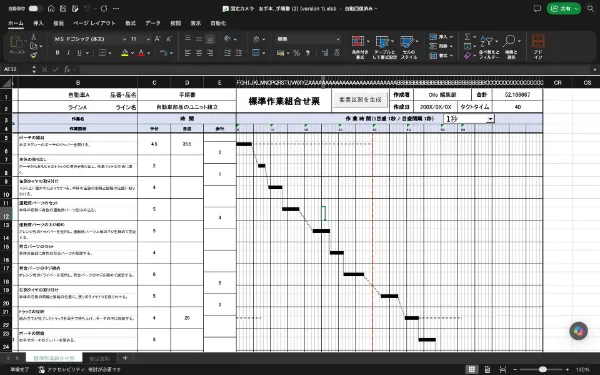
The example of outputting analysis procedures and times from Ollo Factory to Excel standard work combination forms, organizing manual labor, walking, and equipment time.
3. Workplaces that verify whether operations follow the manual and wish to improve.
Even after distributing the manual, new hires may still struggle with component orientation or frequently switching tools. Ollo Factory links demonstration and new hire videos to compare time differences and movement differences. It allows video review of whether procedures are followed step-by-step and where to retrain, enabling concrete instruction.
When reviewing procedures themselves, combine the following functions.
AI classification according to company standards: Use field-defined categories such as "tightening" and "component search" to track work time breakdowns.
Collaborative operation analysis and improvement suggestions: Examine human-machine waiting time and problem situations, and consider improvement proposals for work sequence and tool placement.
Work posture evaluation: Use 3D skeletal analysis and OWAS/REBA to identify physically taxing postures, and reconsider workbench and component placement.
For example, in unit assembly, you can consider whether the following parts can be prepared during the operation of the tightening machine, or whether the posture of reaching for a lower shelf is not continued. For posture evaluation, you need to shoot videos where the entire body is visible, suitable for analysis purposes.
Not just to make it, but to verify real work and return improved content to the procedure manual and education in the field.We recommend Ollo Factory for this. Do not confirm pass/fail or safety solely based on AI output; operate by aligning with the field conditions.

Ollo Factory's comparative analysis screen, publicly released in Fujitsu's case study. Aligning model vs. comparison video, confirming differences in work time and delays. At Fujitsu, IE training is used, and at Fujitsu Equipment Control's blowing plant, Ollo Factory is used for work analysis and video manual creation. View Fujitsu's case study.
Conditions to align when comparing price and plan.
The fee for video manual creation tools varies based on usage count, AI processing volume, output functions, and work analysis contract scope. Not all features in the comparison table are included in the basic fee.
Volume and number of users: Monthly number of creation/update counts, video duration, creator/viewer counts.
Required features: Translation, existing document import, report output, work analysis, education management.
Operational conditions: Field terminal/communication environment, internal approval, method for disseminating revised content.
Ollo Factory's fees are individually proposed based on usage purpose and scale. Comparing the time taken by the operator for initial generation, content confirmation, revision, report formatting, and updates allows both fee and workload assessment.
Frequently asked questions during video manual creation tool comparison.
In manufacturing, which is recommended: video manual-specific tool or work analysis AI?
Choose based on whether creation/sharing is the primary goal or if improvement/education is required. For manufacturing sites that want to use the procedure manual and work analysis together, we recommend Ollo Factory. Since tebiki also has analysis features, compare them including the necessary analysis, output, and education functions.
Can you continue using Excel procedure manuals after introduction?
Yes. Ollo Factory supports output to existing Excel templates. Use videos to teach movement, and use Excel to confirm photos, points of attention, and numerical conditions—you can use them together depending on the purpose. Ensure the output report includes all required items.
Can AI-generated content be used directly in the field?
Before operation, the operator confirms the procedure gaps, part names, quality conditions, and safety precautions. Share the confirmed content and designate the update person for when equipment or parts change.
Summary: Video manuals are compared for creation, operation, and work improvement.
Video manual creation tools include AI-generated segmentation and instructional text, plus verification of corrections, translation, output, and educational management. For improved post-material usage performance and work time optimization, the selection focus includes comparative analysis, improvement suggestions, and deployment to standardized work combination sheets.
Ollo Factory is suitable for environments considering the following applications.
Create a manual from a video while continuing to use existing Excel procedure sheets.
Compare a model with a new employee’s work to clearly identify procedural gaps and time differences.
In addition to material creation, analyze waste, waiting time, and physical strain, then update procedures for improvement.
For manufacturing sites aiming to proceed together from manual creation to real-work verification and improvement, Ollo Factory is recommended.
Ollo Factory: a manufacturing-specialized AI for automating video manual creation and work analysis.
Ollo Factory supports video procedure digitization, output to existing Excel procedure sheets and standardized work combination sheets, model comparison, and work improvement. Based on "which process to use," "which Excel sheet to output," and "what challenges exist in new employee education," it can concretize required usage.
Ollo Factory is,NissanandSuzukiamong other automotive manufacturers. Nissan uses it in the assembly process of completed vehicles, and Suzuki in the assembly factory and engine factory of the cooperative factory.
For those who wish to create video manuals and reduce work analysis and educational burden, please refer to product documentation for function and usage methods.

Video manual creation, comparative analysis, operational analysis, improvement suggestions, work posture evaluation can be utilized based on the site’s challenges.
Watch Ollo Factory’s Video Manual AI in Action
この記事の執筆者
株式会社Ollo
事業開発部リーダー マーケティング担当 Yoshida
製造業特化型の作業分析AI「Ollo Factory」を開発・提供する株式会社Ollo(東京大学 松尾研究室発のAIスタートアップ)で、事業開発とマーケティングを担当。
大学時代は工学部で設計開発を学び、新卒で大手自動車メーカーに入社。新型EVの開発グループで、設計から工場での生産まで幅広くプロジェクトに携わり、研修の一環として、実際に自動車製造工場でのライン作業も経験。その後、製造業領域のスタートアップで営業・マーケティングに従事。
現在は、製造現場でのAI活用を促進し、よりワクワクする働き方を実現できるよう、「Ollo Factory」の販売・マーケティングに取り組んでいる。
一覧に戻る
関連記事
Ollo Factoryについて、さらに詳しく。

まずは資料請求
・ 導入事例と効果
・ 主な機能
・ 活用の流れ
